Offline Conversions · Included in every plan
Teach your ad platforms what a real customer looks like
Ad platforms bid toward what they are told counts. Offline Conversions sends them the results that happen after the click, in your store, your CRM and on the phone, so they find more customers like the ones who actually buy.

01
Rules you can read
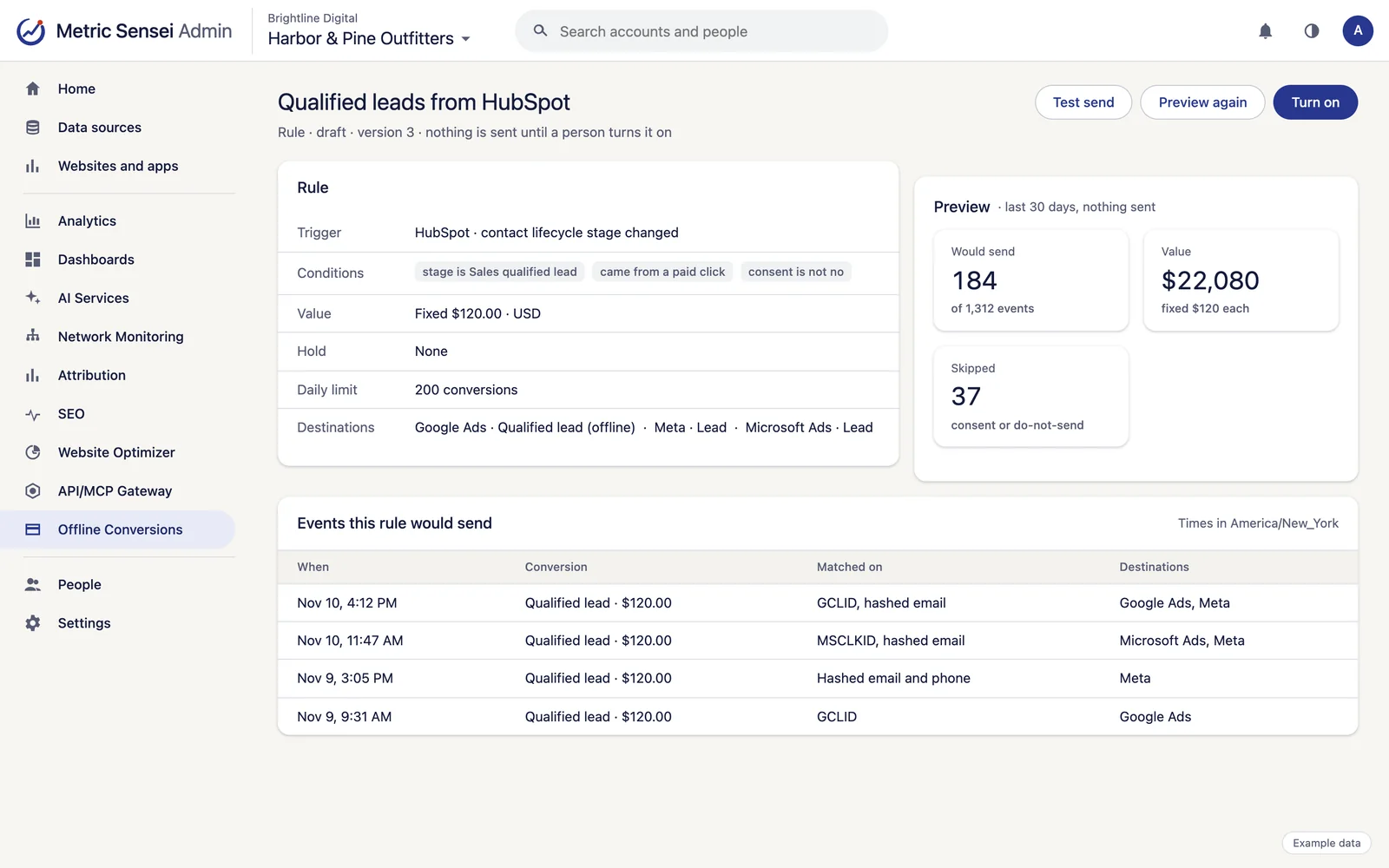
Each rule has a trigger, conditions, a value and destinations.
- Triggers from Shopify and WooCommerce orders, WordPress forms, CallRail and RingCentral calls, Blazeo chats, HubSpot, Salesforce and NetSuite deals, and Google and Meta lead forms.
- Rows from your own data count too: files imported on a schedule, the drop box, the email inbox, Google Sheets and Excel. Send in-store sales or a CRM export without any code.
- Conditions on any field: order value, deal stage, form name, call length, first order, tags, campaign tags or click IDs.
- The record's own value, a fixed value, or a share of it, with a floor and a ceiling.
- Hold a conversion for a few days so cancelled or refunded orders drop out.
02
Safe before it sends
A new rule is a draft and sends nothing until a person turns it on.
- Preview any rule over the last 30 days of your events, without sending.
- Test sends use each platform's own test mode.
- Daily limits per rule, and one switch that pauses every send.
- Each event is sent to each conversion action once.
03
Every send on record
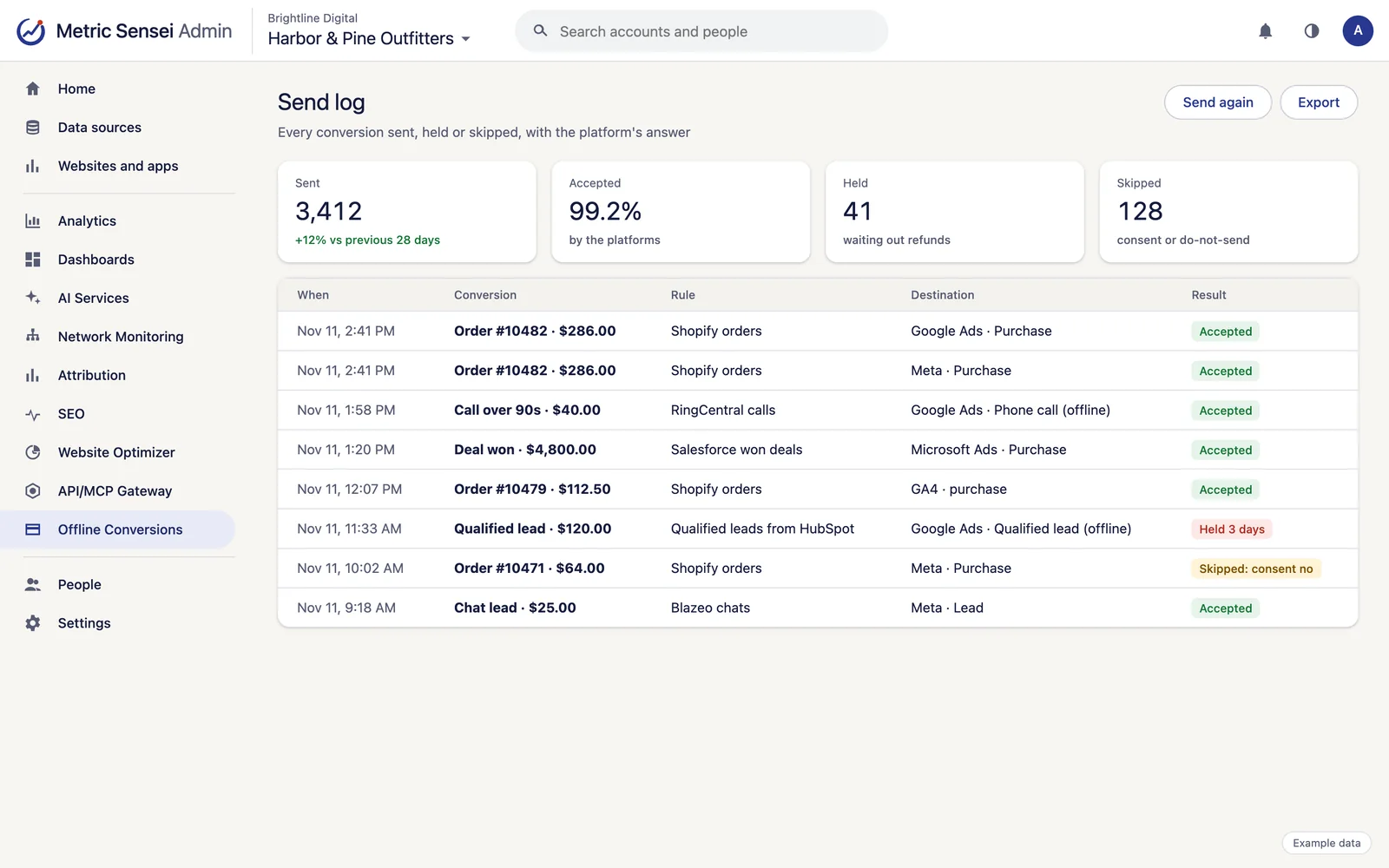
The send log shows what went where, when, and what the platform answered.
- Send again after a fix, or backfill a new rule over past events.
- Every change to a rule is kept in its history.
- Visitors who refused consent, and people on your do-not-send list, are never sent.
- Contact details leave only as SHA-256 hashes, matched with ad click IDs where there are any.
04
An assistant that drafts, never sends
Describe a goal, such as "count leads that became customers", and the assistant studies your events, previews ideas and saves them as draft rules.
- Only a person on the admin page or the Admin API turns a rule on.
- Conversions you already send from Attribution keep working, and can be turned into rules when you are ready.
- Ask the AI to explain why a platform rejected uploads, or to review the values you send.
Works with
Uses the accounts you already have.
Connect each account once and every service can use it.
Google Ads
Campaign, keyword and search-term performance, Local Services Ads leads, conversions sent back, and changes with your approval.
Meta Ads
Facebook and Instagram ad performance, audiences and pixels, with Conversions API sends from Attribution.
Microsoft Advertising
Bing and Microsoft ad performance, conversion goals and UET tags, with offline conversions sent back.
Google Analytics 4
GA4 reports and history beside our own numbers, plus property settings.
Google Data Manager
Customer Match audiences and offline conversions for Google Ads, through Google's Data Manager API.
Shopify
The Metric Sensei app adds the tag and a Web Pixel for checkout, reads orders, products and customers, and matches customers to their visits.
HubSpot
Contacts, companies, deals, forms, marketing emails and campaigns, with won deals sent to the ad platforms.
Salesforce
Leads, opportunities, campaigns, reports and dashboards, with lead sources filled in and won deals sent to the ad platforms.
Oracle NetSuite
Customers, leads, transactions and sales summaries from your ERP.
CallRail
Calls, texts and form submissions, matched to the visit and campaign that started them.
RingCentral
Phone system call logs and analytics (RingEX), and contact center campaigns and leads (RingCX).
Blazeo chat
Chat leads from Blazeo (formerly ApexChat), as they happen.
See every integration.
Who uses it

Online stores
Sales, spend, email, support and shipping in one place, with every order traced to its source.

Lead generation and local services
Every form, call and chat traced to its campaign, with dashboards and AI on top.

Questions
Common questions
How is this different from Attribution's conversions?
Attribution maps an event to a conversion action. Offline Conversions adds rules with conditions and values, previews, test sends, holds, daily limits, a send log and an assistant. Mappings made in Attribution keep sending through it.
Which platforms does it send to?
Google Ads, Meta, Microsoft Advertising, TikTok (Events API) and Google Analytics 4.
Can it send something by mistake?
A rule sends nothing until a person turns it on, after a preview if they like. Each event goes to each conversion action once, and one switch pauses everything.