Analytics
Web analytics you can read in a minute
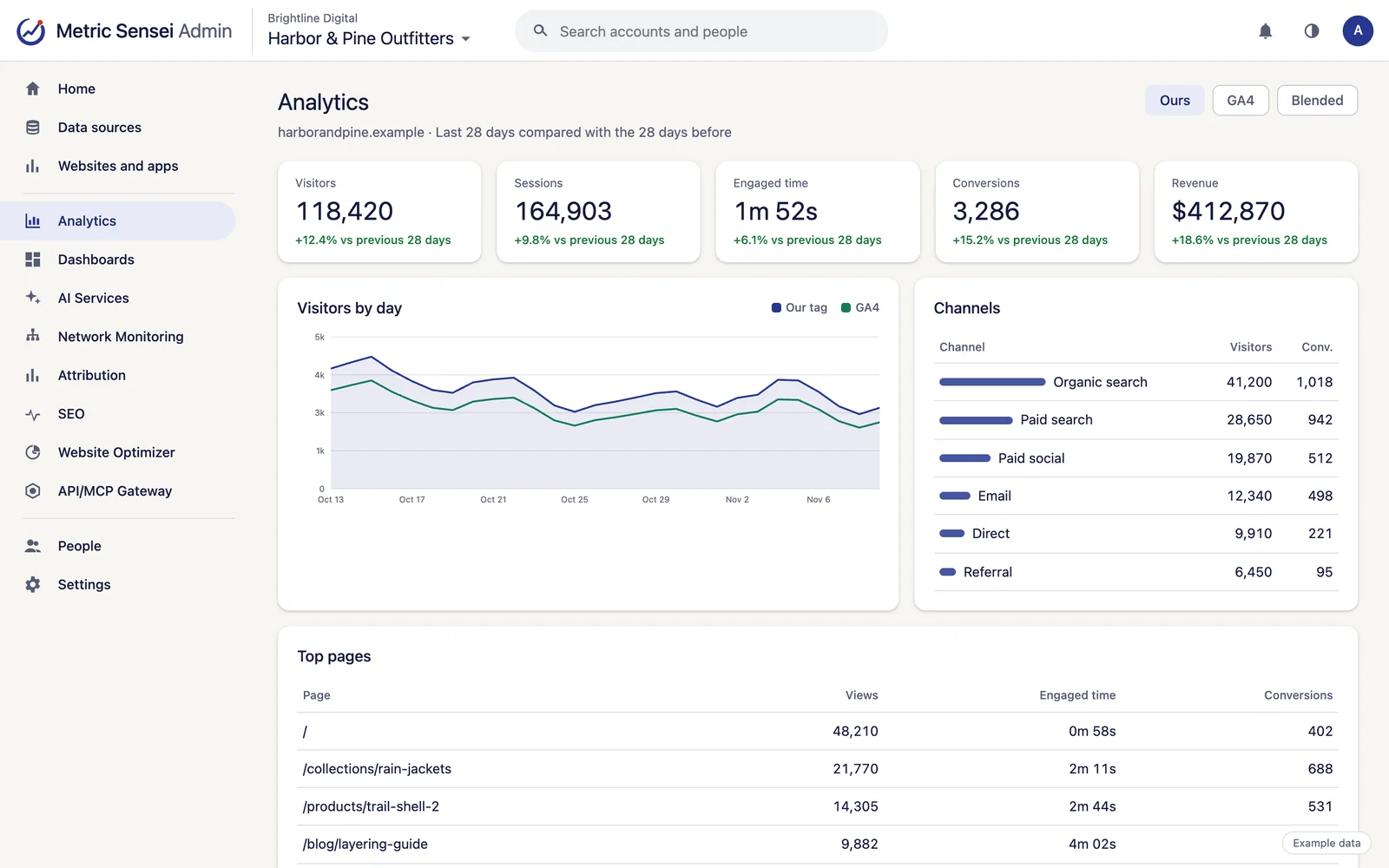
Analytics gives you the reports you actually open: where visitors came from, what they read and what they did, on the same tag as Attribution. It sits beside Google Analytics 4 instead of fighting it.
01
Standard reports, ready on day one
Overview, Channels, SEO and Ecommerce, plus Pages, Locations, Devices, Goals and events, and Funnels. Any date range, compared with the period before, in your website's own time zone.
- Page views, time engaged, scroll depth, outbound links, file downloads and form submits.
- Custom events in the GA4 style, with up to 25 parameters, items and revenue, and goals built from a page or an event. A JavaScript API guide lists every call.
- Realtime: visitors, pages, sources and conversions minute by minute, with a live map.
02
GA4 and our numbers, side by side
Link Google Analytics 4 and a switch shows our tag's numbers, GA4's, or a blended best estimate, which is where reports open. Each person's own pick is remembered. GA4 history comes in too, up to 25 months back.
- The blend accounts for visitors GA4 misses because of consent or blockers.
- GA4-only breakdowns, such as new or returning, age and interests, under Audience.
- A daily data check spots days when either tag stopped recording, and emails the problem.
03
Smart Events: the actions that matter, tracked without code
Metric Sensei reads your website, suggests the key actions to count, such as a quote request, a booking button or a brochure download, and starts counting each one once you approve it.
- Calls, emails, text messages and WhatsApp chats started from your site are counted automatically, with the number or address that was clicked.
- File downloads, outbound links and form submits keep the link, file and button text.
- An event assistant asks what each page is for and drafts the rules. Website Optimizer suggests events it finds missing too.
- Nothing goes live until an admin approves it, and rules never read what visitors type.
04
Your events in your other tools too
Events counted by Metric Sensei are passed on to the other trackers on the page, such as Google Analytics, Google Tag Manager or the Meta Pixel, named with an ms_ prefix.
- On by default, and switched off per website.
- Only with the visitor's consent, and never with an email address or phone number.
- Events a tracker already records itself, such as GA4's own outbound clicks, are not sent twice.
06
Every connected source in the same place
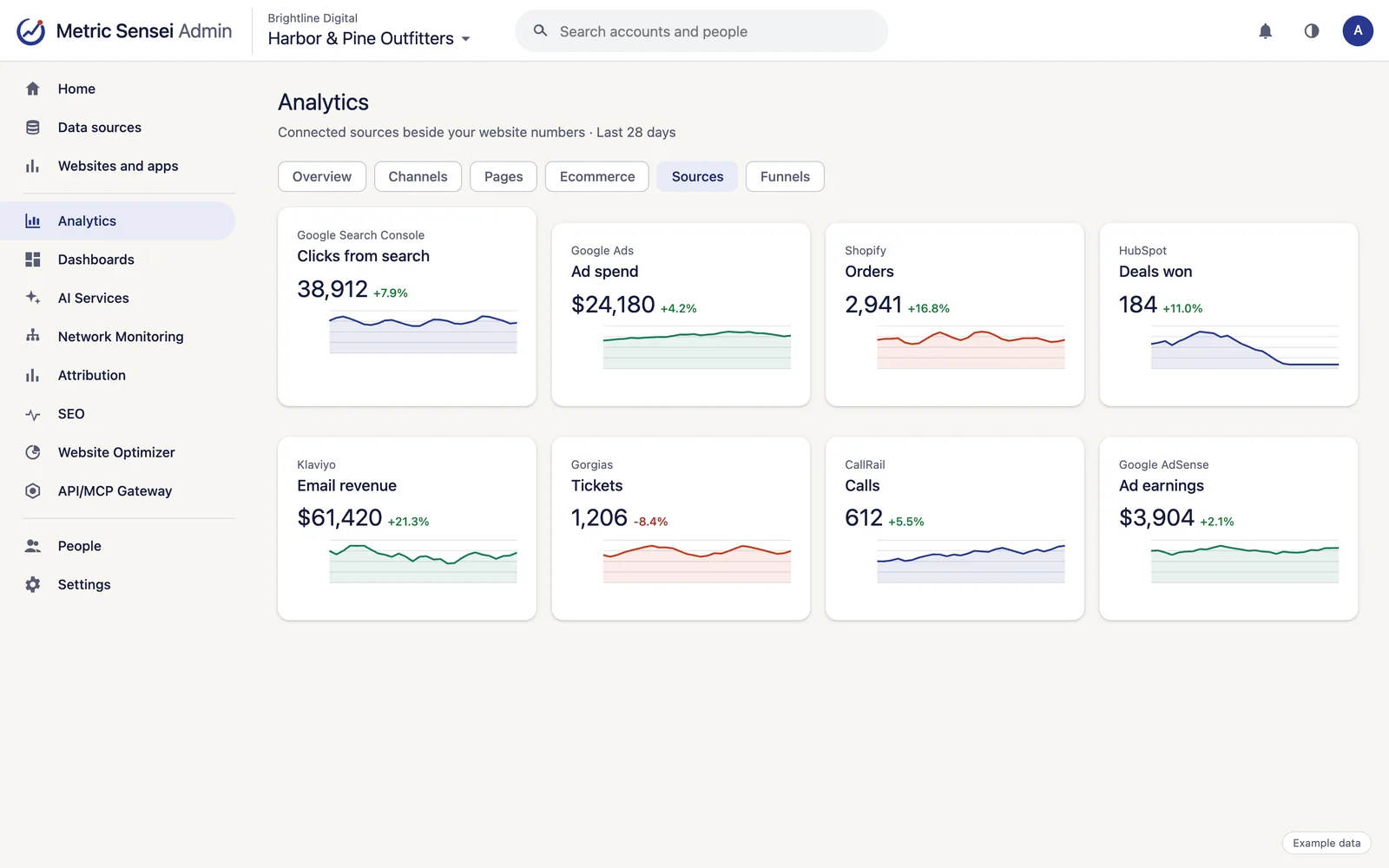
Panels from 24 sources sit next to your website numbers: ads, search, store, CRM, phones, chat, email and support.
- Ads: Google Ads, Meta Ads, Microsoft Advertising, MNTN and AdSense earnings.
- Search and site: Search Console, Bing Webmaster Tools, Business Profile, PageSpeed and Merchant Center.
- Sales and CRM: Shopify, WooCommerce, HubSpot, Salesforce and NetSuite.
- Calls, chat, email and support: CallRail, RingCentral, Blazeo, Mailchimp, Klaviyo and Gorgias, plus Facebook Pages and Instagram.
- Pin any breakdown to a dashboard when Dashboards is on, and the AI assistant can read the same reports.
07
Privacy by design
Analytics stores no IP addresses, full user agents, query strings or form values, and sets no cookies of its own.
- Without Attribution, visitors are counted with a daily anonymous hash whose salt is deleted after two days.
- A browser's Global Privacy Control signal is treated as a refusal.
- Bot and data-center traffic is kept out of the numbers.
08
Apps and servers too
iOS and Android SDKs, and server-side clients for Node, Python and PHP, send events to the same reports.
Add-ons
Turn on more when you need it.
Add-on
Session replay
Watch how visitors used a page in a sample of visits. Everything typed into fields is masked, and by default all page text is masked too. Recordings are kept for 30 days.
Add-on
A/B tests and feature flags
Test two versions of a page or roll a feature out to part of your traffic, and see the result in the same reports. Website Optimizer can draft tests from its recommendations.
Add-on
Warehouse export
Every day, yesterday's raw events and daily totals are delivered to your own Amazon S3 bucket, ready for BigQuery, Snowflake or any other warehouse to load.
Works with
Uses the accounts you already have.
Connect each account once and every service can use it.
Google Analytics 4
GA4 reports and history beside our own numbers, plus property settings.
Google Search Console
Searches, clicks and positions for your pages, URL inspection and sitemaps.
Google Ads
Campaign, keyword and search-term performance, Local Services Ads leads, conversions sent back, and changes with your approval.
Meta Ads
Facebook and Instagram ad performance, audiences and pixels, with Conversions API sends from Attribution.
Shopify
The Metric Sensei app adds the tag and a Web Pixel for checkout, reads orders, products and customers, and matches customers to their visits.
HubSpot
Contacts, companies, deals, forms, marketing emails and campaigns, with won deals sent to the ad platforms.
Klaviyo
Email and SMS campaigns, flows, sign-up forms, lists, segments and their results.
Gorgias
Helpdesk tickets, customers with their store orders, satisfaction surveys, support statistics and voice calls.
Google AdSense
Earnings by site, page, ad unit and country, with payments, alerts, policy issues and an ads.txt check.
CallRail
Calls, texts and form submissions, matched to the visit and campaign that started them.
RingCentral
Phone system call logs and analytics (RingEX), and contact center campaigns and leads (RingCX).
PageSpeed Insights
Lighthouse tests and real-visitor Core Web Vitals for any page.
See every integration.
Who uses it

Online stores
Sales, spend, email, support and shipping in one place, with every order traced to its source.

Lead generation and local services
Every form, call and chat traced to its campaign, with dashboards and AI on top.


Multi-location businesses and IT teams
Watch the network at every location, and the websites and accounts that bring in customers.

Data and AI teams
One API and MCP server for every connected account, and raw events in your warehouse.
Questions
Common questions
Do I need a cookie banner for Analytics?
Analytics sets no cookies of its own and stores no IP addresses. Whether your site needs a banner depends on the laws where your visitors are and on the other tools you run, so check with your adviser.
Why do your numbers differ from GA4?
GA4 misses visitors who refuse consent or block its tag, and it samples some reports. The data check shows the gap day by day, and the blended view estimates the full picture.
Can I keep Google Analytics?
Yes. Keep it running alongside. Linking GA4 brings its history and its audience reports into Metric Sensei.